
July 31, 2026
Custom CRM Development Cost 2026: Hybrid vs. Fully Custom
Author
Compare off-the-shelf, hybrid, and fully custom CRM options—and see what each budget actually buys.
Custom CRM development typically starts around $20,000 for a hybrid build and $30,000 for a tightly scoped fully custom system. Platforms that unify several departments, regulated workflows, legacy systems, reporting, mobile access, and AI can exceed $100,000.
Do not build one if standard CRM software already covers most of your operation.
An off-the-shelf CRM is usually faster and cheaper when a few integrations or automations close the gaps. Custom development becomes relevant when those gaps are the operation.
A home healthcare company may need one system for caregivers, patients, training, state compliance, field visits, and billing. A property tax firm may need to connect marketing, intake, proprietary case logic, county filings, deadlines, and reporting.
A standard CRM may manage part of that work.
It cannot run the complete operation without substantial custom engineering.
The right architecture determines the cost.

What Are Your Three CRM Options?
You can buy ready-made CRM software, build custom workflows on an existing core, or develop the entire system around your operation.
AI can be used with any option. The difference is how much control you have over the data and workflow.
| Option | What it means | Best when |
|---|---|---|
| Off-the-shelf CRM | Ready-made software for common sales and customer-management processes | Your processes are mostly standard and a few integrations close the gaps |
| Hybrid CRM | A prebuilt CRM core with custom workflows, integrations, portals, and reporting added | Standard CRM functions still fit, but the wider operation does not |
| Fully custom CRM | A system built from the ground up around your data, rules, and workflows | Existing CRM platforms would constrain most of the operation |
When Is an Off-the-Shelf CRM Enough?
Use an off-the-shelf CRM when your main need is managing leads, contacts, deals, tasks, emails, and sales reports.
Most CRM platforms already do those things well. Many also include AI for drafting emails, summarizing calls, or suggesting follow-up tasks.
They are enough when:
- Your work follows a straightforward lead-to-sale process.
- The CRM handles every critical step.
- A few integrations or automations close the remaining gaps.
- The CRM remains the reliable source of customer data.
In that case, buy the software.
Custom development is unnecessary.
The problem starts when winning the deal is only the beginning. A healthcare company may still manage caregivers, training, compliance, scheduling, and field work elsewhere. A property tax firm may still depend on separate tools for intake, case logic, deadlines, and filings.
When the CRM tracks the client but cannot run the operation, consider a hybrid or fully custom system.
When Does a Hybrid CRM Make Sense?
A hybrid CRM combines a ready-made CRM core with custom features built around your operation. The core may be open-source, such as EspoCRM or SuiteCRM, or proprietary, such as a licensed CRM script.
The core handles common functions such as contacts, users, permissions, tasks, and pipelines. Custom development adds the parts generic CRM software cannot support:
- Industry-specific records and workflows
- Compliance rules and audit trails
- Client, employee, or vendor portals
- ERP, accounting, and legacy-system integrations
- Document automation
- Custom dashboards and reporting
- AI-assisted search, extraction, summarization, or routing
A hybrid CRM makes sense when:
- Standard CRM modules remain useful.
- Your unique workflows can sit on top of the core.
- You need one system across sales and operations.
- Generic CRM software leaves critical work outside the platform.
- Reusing the core saves more work than it creates.
Consider a home healthcare company. The core may store patient and caregiver records, while the custom layer manages recruitment, training, state compliance, scheduling, field visits, and reporting.
AI could extract information from caregiver documents, summarize records, or flag missing compliance evidence for staff review.
The result is one connected system without rebuilding ordinary CRM features from scratch.
A hybrid CRM adapts the software.
If most of the core must be rewritten, it is no longer saving money. That is when a fully custom CRM becomes the better option.
When Does a Fully Custom CRM Make Sense?
A fully custom CRM is built from the ground up around your data, workflows, rules, reporting, and AI requirements. It does not rely on a prebuilt CRM core.
The development team creates the complete foundation:
- Custom data model
- Roles and permissions
- Proprietary workflows and rules
- Integrations, portals, and mobile applications
- Reporting, automation, and AI controls
A fully custom CRM makes sense when:
- Your operation does not fit a standard CRM model.
- Most prebuilt modules would need to be replaced.
- Proprietary rules control the customer or case lifecycle.
- Several departments must work from one custom data model.
- AI must operate across several workflows and data sources.
- The system will become a proprietary product or competitive advantage.
- Full architectural control justifies the higher cost.
Consider a property tax firm. Its system may need to connect direct-mail campaigns, property records, client intake, proprietary case qualification, filing deadlines, county submissions, communication, and reporting.
AI might extract property information, summarize case histories, or draft client communication. The underlying qualification and filing rules would remain fixed, testable, and auditable.
A hybrid CRM adapts an existing foundation.
A fully custom CRM creates the foundation the operation requires.
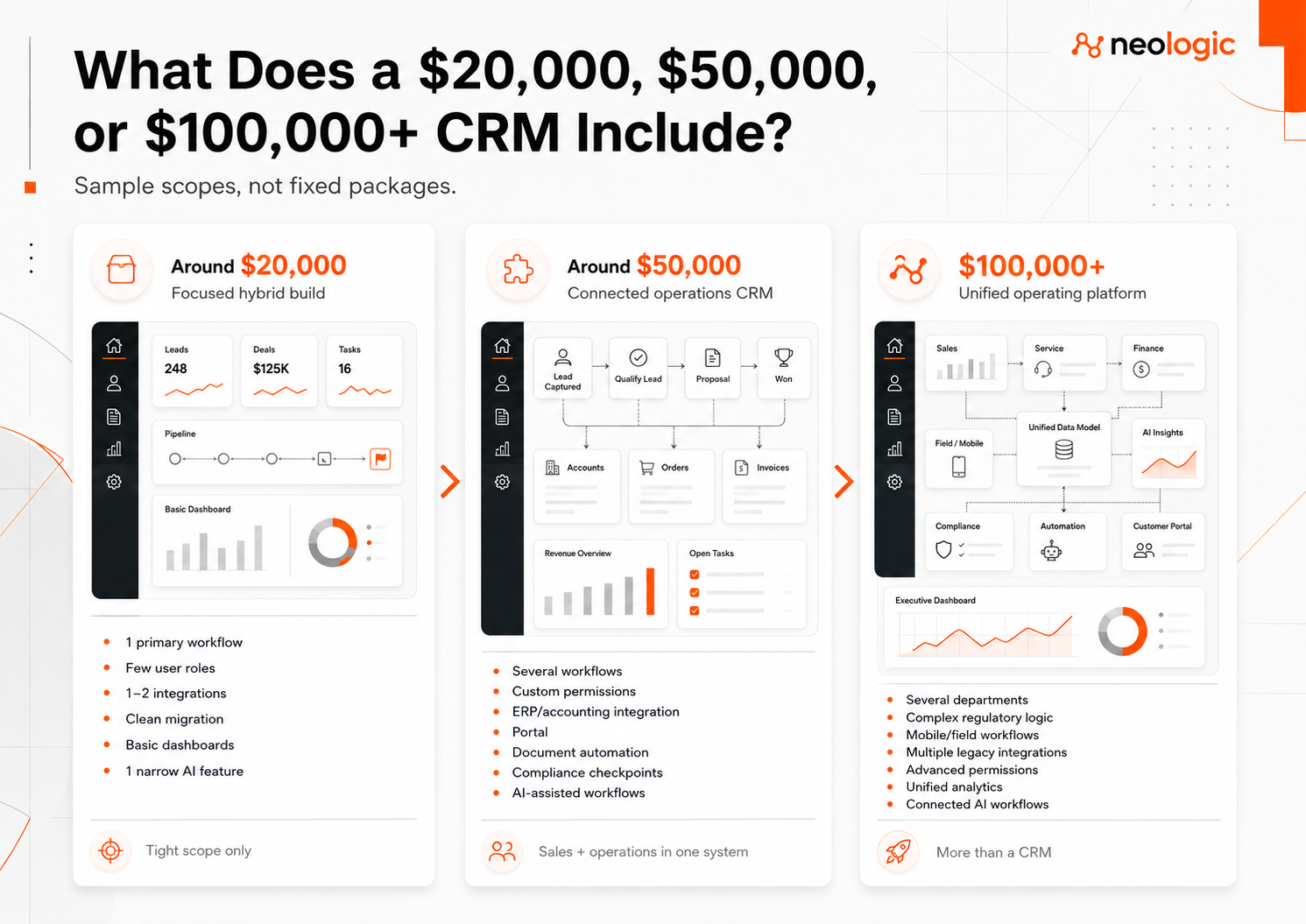
What Does a $20,000, $50,000, or $100,000+ CRM Include?
CRM cost rises with how much of the operation the system must run, how many systems it must connect, and how many rules it must enforce.
These are sample scopes, not fixed packages.
What Can a CRM Budget Around $20,000 Cover?
A budget around $20,000 usually covers a focused hybrid CRM built on an existing core.
The scope may include:
- One primary workflow
- A few user roles
- One or two integrations
- Clean spreadsheet migration
- Basic dashboards
- Responsive web access
One narrow AI feature may fit if the rest of the scope remains simple. Examples include note summarization or document extraction using an existing AI service.
This budget will not realistically cover:
- Several departments
- Complex regulatory workflows
- Large legacy migrations
- Mobile field operations
- Extensive custom analytics
- Multiple difficult integrations
- Company-wide AI automation
At this budget, the scope must stay tight.
What Can a CRM Budget Around $50,000 Cover?
A budget around $50,000 can support several connected workflows across sales and operations.
The scope may include:
- Multiple operational workflows
- Custom roles and permissions
- ERP or accounting integration
- A client, employee, or vendor portal
- Document automation
- Custom dashboards
- Moderate data migration
- Compliance checkpoints
- Automated notifications and handoffs
- One or two AI-assisted workflows with human review
For a home healthcare company, that could mean connecting office staff, caregiver onboarding, training records, compliance deadlines, scheduling, and management reporting.
AI might extract caregiver documents or flag missing compliance information for staff review.
At this level, the CRM begins coordinating operations, not just tracking leads and customers.
What Can a CRM Budget Above $100,000 Cover?
A budget above $100,000 can support a unified operational platform built around several departments, complex rules, and proprietary workflows.
The scope may include:
- Ground-up or heavily customized architecture
- Several departments and user groups
- Complex regulatory logic
- Mobile or field workflows
- Multiple legacy integrations
- Large or damaged data migrations
- Advanced permissions
- Complete audit trails
- Unified operational analytics
- High-volume automation
- Several connected AI workflows
- Human approval, logging, and fallback rules
For a property tax firm, that could mean one platform spanning marketing, intake, proprietary case logic, regulated filings, deadlines, and reporting.
AI might extract property data, classify documents, summarize case histories, or draft communication. Uncertain results would be logged and routed to staff.
At this level, the system is more than a CRM. It becomes the operating platform for the business.
What Determines Custom CRM Development Cost?
Custom CRM development cost depends on how much of the operation the system must control, how many rules it must enforce, and how difficult the data is to connect.

How Much of the Business Must the CRM Run?
A CRM that tracks leads costs less than a platform that runs the complete customer or case lifecycle.
The scope may cover:
- Leads and sales
- Sales and operations
- Service delivery
- Compliance
- Billing
- Reporting
- The entire client lifecycle
For a healthcare company, the CRM may connect recruitment, caregiver training, scheduling, field visits, patient records, compliance, and billing.
For a property tax firm, it may connect marketing, intake, case qualification, filings, deadlines, communication, and reporting.
The more of the business the CRM runs, the more it costs.
How Complex Are the Workflows and Regulations?
Standard steps cost less than workflows built around proprietary rules, calculations, approvals, deadlines, and exceptions.
Cost rises when the CRM must handle:
- Conditional rules
- Multi-step approvals
- Custom calculations
- Compliance checks
- Regulatory deadlines
- Department handoffs
- Escalations
- Audit requirements
A property tax system may need to calculate filing eligibility, track county deadlines, and prevent invalid submissions.
A healthcare CRM may need to block assignments when caregiver training or credentials are incomplete.
The normal path is easy.
The exceptions require the engineering.
How Many Systems Must Be Connected?
Every integration adds data mapping, error handling, testing, and maintenance.
The CRM may need to connect:
- ERP software
- Accounting systems
- Scheduling tools
- Marketing platforms
- Telephony
- Document systems
- Field applications
- Legacy databases
A simple connection to a modern API may be straightforward.
A two-way sync with an old database is not.
Cost also rises when several systems store different versions of the same patient, caregiver, property, or client record.
How Complex Are the Data and Permissions?
Simple contact records cost less than connected data covering people, properties, cases, visits, filings, and compliance history.
The CRM may need to relate:
- Patients and caregivers
- Properties and cases
- Service visits
- Filings
- Training records
- Compliance documents
- Payments and invoices
Permissions add another layer.
Office staff, field workers, managers, clients, and administrators may each need different access. Some users may see only specific records, regions, departments, or fields.
The more sensitive the data, the more carefully access must be designed.
How Difficult Is the Data Migration?
A clean spreadsheet import costs less than rebuilding years of fragmented operational history.
Migration becomes more expensive when data comes from several databases, spreadsheets, paper records, shared drives, email, or legacy CRM systems.
The work may include:
- Removing duplicates
- Resolving conflicting records
- Mapping old fields to the new system
- Preserving attachments
- Rebuilding record relationships
- Validating the final import
Moving data is easy.
Deciding which data is correct is not.
Does Leadership Need Unified Reporting?
Basic dashboards cost less than reporting built across several departments and systems.
Leadership may need:
- One source of truth
- Cross-department dashboards
- Compliance and risk visibility
- Operational capacity
- Revenue and margin reporting
A healthcare owner may need to see staffing gaps, expired credentials, training status, field activity, and billing readiness in one place.
Unified reporting only works when the underlying data is also unified.
How Do AI Features Affect CRM Development Cost?
A narrow AI feature can be relatively inexpensive. AI becomes more costly when it must use sensitive data, work across several systems, and take action inside a critical workflow.
Simple features may include:
- Summarizing notes
- Drafting emails
- Extracting fields from documents
- Classifying records
- Searching internal information
More complex AI may review compliance documents, recommend the next step, route exceptions, or update CRM records.
The cost depends on:
- Data quality
- Security and permissions
- Number of connected systems
- Required accuracy
- Human review
- Audit trails
- Usage volume
- Fallback rules
Summarizing a note is one feature.
Reviewing a record, updating the CRM, and routing an exception safely is a complete workflow.
How Is Custom CRM Development Cost Calculated?
The cost to develop a CRM system depends on its foundation, custom logic, integrations, data, security, AI, testing, and deployment.
CRM cost = discovery and prototype + platform foundation + custom workflows + integrations + migration + security + optional AI functionality + testing + deployment
| Lower-cost condition | Higher-cost condition |
|---|---|
| Existing CRM core fits | Ground-up architecture |
| One stable workflow | Several conditional workflows |
| Modern, documented APIs | Legacy or undocumented systems |
| Clean, consistent data | Duplicate or conflicting records |
| Standard user roles | Record-level permissions |
| Fixed dashboards | Unified operational analytics |
| Responsive web access | Mobile and offline workflows |
| Standard security | Regulated data and audit controls |
| One narrow AI task | AI working across several systems and workflows |
A responsible estimate comes after the workflows, exceptions, integrations, and data have been mapped.
Before that, it is a guess.
How Can You Reduce Custom CRM Development Cost?
Cut uncertainty and unnecessary scope before development—not quality during development.
- Buy standard software when it fits. If it can run the complete critical workflow, custom development is unnecessary.
- Reuse a CRM core when it saves real work. Do not rebuild contacts, users, tasks, and permissions without a clear reason.
- Map and prototype the operation first. Hidden rules and exceptions become expensive after development starts.
- Build the highest-value workflow first. Start with the process creating the most cost, risk, delay, or manual work.
- Integrate systems that still work. Do not replace accounting, scheduling, or document tools without a business case.
- Clean the data before migration. Developers should not be paid to decide which duplicate patient, caregiver, client, or case record is correct.
- Keep AI focused. Start with one defined task before building connected AI workflows.
Cut anything that changes no business decision.
Save the cash.
How Does Neologic Price and Build a Custom CRM?
I’m Dmitriy Fridlyand, founder and principal strategist at Neologic. I price a custom CRM only after I map the operation, prototype the system, and remove the unknowns that make budgets grow.
1. Discovery
I determine whether you should:
- Buy standard CRM software
- Connect the systems you already use
- Build on a CRM core
- Develop the system from scratch
If a simpler option can run the complete workflow, I will recommend it.
2. Workflow Audit
I map how the business actually works:
- Processes and department handoffs
- Rules, approvals, and exceptions
- Regulatory requirements
- Data and permissions
- Existing systems and integrations
- Reporting and AI use cases
This exposes hidden requirements before they become expensive changes.
3. Prototype and Budget Guarantee
I turn the workflow into a clickable model of the complete CRM.
Your team tests the forms, dashboards, permissions, handoffs, and AI-assisted steps before production development begins.
Once the prototype and scope are approved, I lock the price in writing.
If I miss something included in the approved scope, you do not pay for my mistake.
4. Engineering
My global team of 30+ senior engineers builds the approved architecture while I remain your single point of contact.
We reuse proven components and use AI-assisted engineering for routine code, tests, and documentation. Your budget stays focused on the business logic that makes the CRM valuable.
I remain accountable for the result.
5. Handoff and Support
After testing and deployment, you receive:
- The custom source code created for the project
- Ownership of the agreed intellectual property
- Technical documentation
- Access to the infrastructure
- Ongoing support options
Any open-source or licensed components remain subject to their original licenses.
You are not dependent on Neologic to operate the system.
Frequently Asked questions
How Much Does It Cost to Develop a CRM?
A focused hybrid CRM usually starts around $20,000. A tightly scoped fully custom CRM may start around $30,000. Platforms connecting several departments, regulated workflows, legacy systems, mobile access, reporting, or AI can exceed $100,000.
The real cost depends on how much of the operation the CRM must run.
What Is the Difference Between Hybrid and Fully Custom CRM?
A hybrid CRM uses a prebuilt core for standard functions such as contacts, users, tasks, and permissions. Custom development adds your workflows, integrations, portals, compliance rules, reporting, and AI features.
A fully custom CRM is built from the ground up because the standard CRM model does not fit the operation.
When Is an Off-the-Shelf CRM Enough?
Use an off-the-shelf CRM when it can handle the complete critical workflow with a few integrations or automations.
If it manages leads but scheduling, compliance, service delivery, filings, or billing still happen elsewhere, it is solving only part of the problem.
Can a Custom CRM Replace Several Business Systems?
Yes. A custom CRM can connect sales, operations, compliance, scheduling, documents, billing, field work, and reporting in one system.
It can also integrate with tools worth keeping, such as accounting or ERP software. Replacing everything is rarely necessary.
How Much Do AI Features Add to CRM Development Cost?
A narrow feature such as note summarization or document extraction may add limited scope.
Costs rise when AI must use sensitive data, work across several systems, update records, follow permissions, log its actions, and route uncertain results for human review.
How Long Does Custom CRM Development Take?
A focused hybrid CRM may take a few months. A fully custom platform with several departments, complex migration, mobile workflows, compliance, or AI will take longer.
The schedule should be set after the workflows, integrations, and exceptions are mapped.
Do You Need a Custom CRM—or a Better Standard Setup?
I will review your workflow and tell you which path makes financial sense: buy standard software, connect what you already use, build on a CRM core, or start from scratch.
No default pitch.
Just a clear recommendation.